Many advertisers look at Google Search Ads and paid social ads as separate marketing channels. They measure the performance of each platform individually and make decisions based on those results.
However, customers often interact with multiple ads before making a purchase or filling out a lead form. Because of this, the success of your Search campaigns may depend more on your paid social campaigns than you realize.
What Is ROAS?
ROAS stands for Return on Ad Spend. It measures how much revenue you earn for every amount you spend on advertising.
For example, if you spend ₹1,000 on ads and generate ₹5,000 in sales, your ROAS is 5.
A higher ROAS usually means your campaigns are generating better returns.
How Paid Social Supports Search Campaigns
Many people do not buy a product the first time they see an ad.
A customer journey often looks like this:
They see your ad on Facebook or Instagram.
They learn about your brand.
A few days later, they search for your business on Google.
They click your Search ad or website and complete a purchase.
In this case, the Search campaign gets the final conversion, but the paid social campaign helped create the initial interest.
Why Looking at Only Search Data Can Be Misleading
If you only evaluate your Search campaigns, you may think they are responsible for every conversion.
But in many cases, paid social has already introduced your business to potential customers.
Without that first interaction, users might never have searched for your brand.
This is why it is important to understand the complete customer journey instead of looking at one platform in isolation.
How to Measure Performance More Accurately
To better understand how your campaigns work together:
Use accurate conversion tracking.
Review attribution reports in your analytics tools.
Compare assisted conversions, not just last-click conversions.
Monitor branded search traffic after running social campaigns.
Look at overall business results instead of focusing on a single platform.
These insights can help you see the full impact of your advertising efforts.
Should You Stop Running Paid Social?
Not necessarily.
If your Search campaigns are performing well, it may be because your paid social campaigns are helping build awareness and interest.
Reducing social advertising without reviewing the data could affect Search performance over time.
Instead of treating Search and paid social as separate strategies, think of them as channels that support each other.
Final Thoughts
Search Ads and paid social campaigns often work together to drive results. While Search may capture the final conversion, paid social can play an important role in introducing your brand and influencing customer decisions.
To make better marketing decisions, review the entire customer journey instead of relying on one metric or one advertising platform. Understanding how different channels work together will help you build stronger campaigns and improve your overall return on ad spend.
When running PPC campaigns, many advertisers spend a large part of their budget at the beginning of the month. This approach is known as frontloading your ad spend.
Although it may seem like a good way to get quick results, it often leads to poor campaign performance later in the month.
Let’s understand why.
What Is Frontloading?
Frontloading means using a large portion of your advertising budget in the first few days or weeks instead of spreading it evenly across the month.
For example, if your monthly budget is ₹60,000, you might spend ₹40,000 in the first two weeks and only ₹20,000 during the rest of the month.
Why Can This Be a Problem?
Spending too much too early can create several issues.
You May Miss Future Customers
People search for products and services every day. If your budget runs low before the month ends, your ads may stop showing.
This means you could miss potential customers who are ready to buy later in the month.
Campaign Learning Can Be Affected
Google Ads uses campaign data to improve performance over time.
Large changes in spending can make it harder for automated bidding strategies to learn and adjust properly.
A stable budget usually gives the system more consistent data.
Seasonal Demand Can Change
Customer demand is not the same every day.
Some days may bring more valuable traffic than others.
If most of your budget is already spent, you may not have enough money left when demand increases later in the month.
Budget Becomes Difficult to Manage
Frontloading often makes it harder to control spending.
You may need to reduce budgets suddenly after spending too much early in the month, which can affect campaign performance and ad visibility.
A Better Approach
Instead of spending heavily at the beginning of the month, try to spread your budget more evenly.
This allows your ads to appear throughout the month and gives you more flexibility to respond to changes in performance.
You can also:
Review campaign performance every week
Increase budgets only for campaigns performing well
Monitor conversion costs regularly
Keep enough budget available for important sales periods
When Can Frontloading Make Sense?
There are a few situations where spending more early can be reasonable, such as:
A limited-time sale
A product launch
A holiday promotion
A short marketing campaign
Even then, your budget should match your campaign goals rather than being increased without a clear reason.
Final Thoughts
Frontloading your ad spend may seem like a fast way to get results, but it often reduces your ability to reach customers later in the month.
A balanced budget helps keep your campaigns running consistently, supports better optimization, and allows you to take advantage of new opportunities as they arise.
For most advertisers, steady spending combined with regular performance reviews is a more reliable way to achieve long-term success with Google Ads.
Artificial intelligence (AI) is changing how advertisers manage Pay-Per-Click (PPC) campaigns. Many people wonder if AI will replace PPC professionals completely.
The answer is no.
AI is becoming an important tool, but people still play the biggest role in creating successful advertising campaigns.
Can AI Replace PPC Experts?
AI can complete many tasks automatically, such as:
Adjusting bids
Finding new search opportunities
Creating ad variations
Predicting user behavior
Optimizing campaigns based on data
These features save time and help advertisers manage campaigns more efficiently.
However, AI cannot understand your business goals the way a human can.
Why Human Decisions Still Matter
A PPC specialist makes important decisions that AI cannot make on its own.
For example:
Setting business goals
Choosing the right marketing strategy
Understanding customer needs
Planning seasonal campaigns
Managing advertising budgets
Making final decisions based on business priorities
These decisions require experience and business knowledge.
AI Works Best as a Helper
Think of AI as a smart assistant rather than a replacement.
A human decides:
What products to promote
Who the target audience should be
How much to spend
Which campaigns deserve more investment
AI then helps by carrying out many of the daily optimization tasks automatically.
This combination allows advertisers to spend more time on strategy and less time on repetitive work.
The Importance of Performance Data
No matter how advanced AI becomes, campaign data remains the most important factor.
Advertisers should regularly review:
Conversions
Cost per conversion (CPA)
Return on ad spend (ROAS)
Click-through rate (CTR)
Search terms
Audience performance
These numbers help determine whether a campaign is meeting business goals.
The Future of PPC
As AI continues to improve, automation will become a larger part of campaign management.
But businesses will still need people to:
Set clear objectives
Monitor campaign performance
Make strategic decisions
Solve business challenges
Adapt to market changes
AI can process data quickly, but it cannot replace human judgment and experience.
Final Thoughts
The future of PPC is not about AI replacing marketers. It is about people and technology working together.
Humans provide the strategy, business understanding, and decision-making. AI helps execute many tasks faster and more efficiently.
The strongest PPC campaigns will come from combining human expertise with AI-powered tools, using data to guide every decision.
After Google said it had already filtered suspicious activity, this unexpected approach restored campaign profitability.
Advertisers are estimated to lose $172 billion a year due to ad fraud by 2028.
The problem is especially common in industries with high competition and CPCs. One of our clients operated in just such an industry, where high invalid click activity was tanking campaign performance.
By adjusting Google Ads targeting, we reduced invalid-click activity by 50% and restored profitable performance.
Case study: How we cut invalid clicks by 50%
Our client sold book editing and ghostwriting services. The search terms that triggered our ads were relevant and high intent. Yet the traffic wasn’t converting at anywhere near a profitable rate.
We quickly identified signs of click fraud, including:
Google reporting a 60% to 80% invalid click rate.
Microsoft Clarity recordings showing bot-like behavior from Google Ads traffic.
80%+ click-through rates across numerous search terms, with some exceeding 100%.
Far fewer sessions in GA4 and other analytics tools than the number of clicks Google Ads reported.
We tried third-party click fraud tools but saw no measurable performance improvement.
Next, we filed an investigation with Google. Google agreed there was suspicious activity but said it had caught it all and hadn’t charged for it.
We were confident Google wasn’t filtering out all the invalid activity, so we took matters into our own hands.
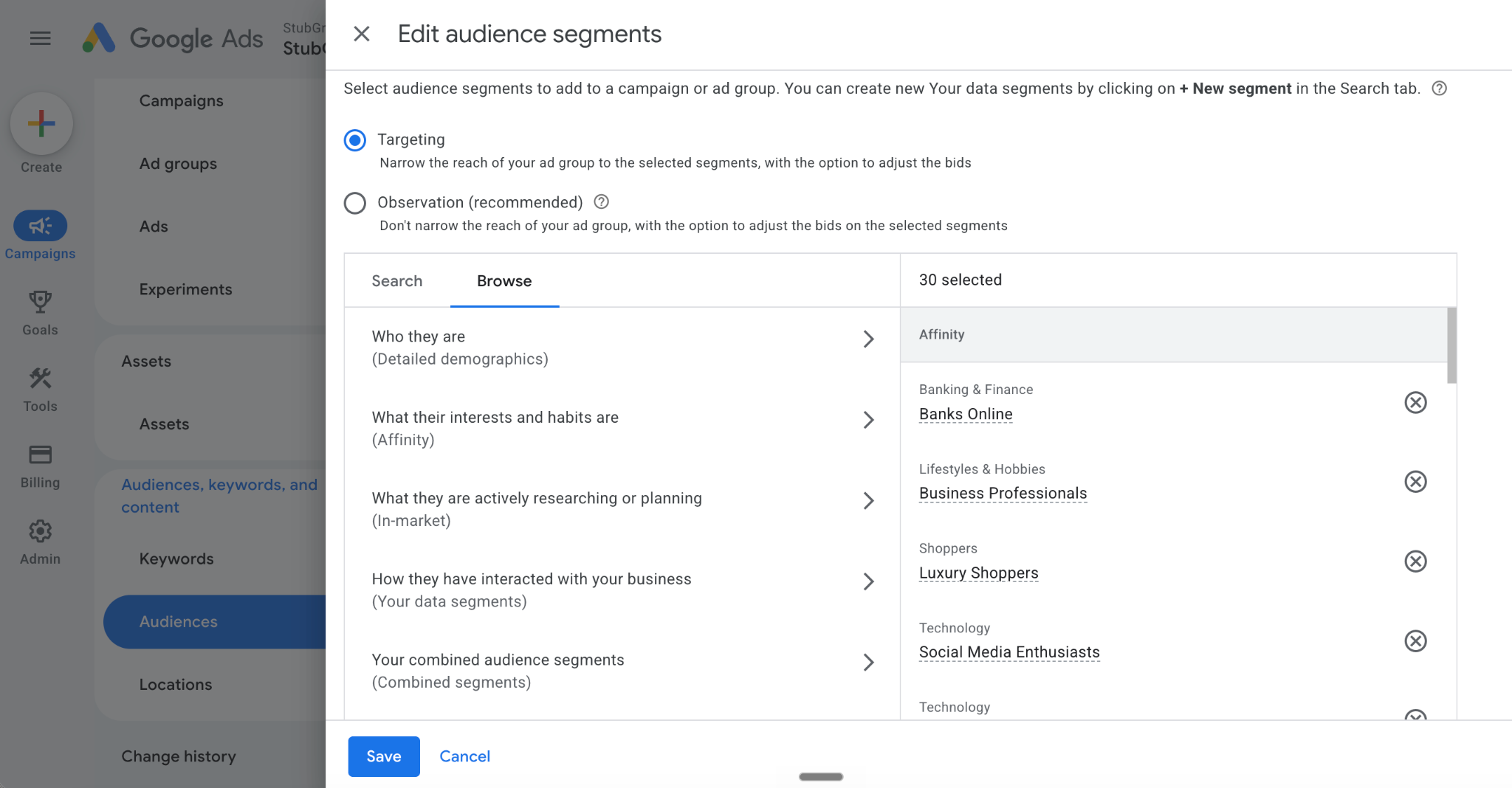
We added 540 Google-defined audiences set to “Targeting” to our Google Search campaigns.
The invalid click rate immediately dropped by 50%, and the conversion rate increased to profitable levels.
We’ll explain why we tested this approach and why we believe it worked.
First, let’s review what invalid clicks are and the standard ways advertisers combat them.
What click fraud and ‘invalid clicks’ actually are
Google defines invalid clicks as:
“Clicks on ads that aren’t the result of genuine user interest, including intentionally fraudulent traffic and accidental or duplicate clicks.”
This includes actual fraud from competitors clicking your ads, as well as accidental double-taps.
Google doesn’t charge advertisers for clicks it deems invalid. Google also credits advertisers for clicks it initially charged for if it later determines those clicks were invalid.
Why the usual defenses sometimes fall short
Google’s detection system catches a lot of invalid click activity, but as our example shows, it’s not perfect.
Because of this, an entire industry of third-party tools tries to block fraud-prone IP addresses before they cost you.
Unfortunately, fraudsters know how these tools work and often cycle through IP addresses using VPNs to stay one step ahead of the monitoring software.
A tool may identify suspicious activity from an IP address and block that address from seeing Google ads in the future. But if the fraudster uses a new IP address each time, blocking previous addresses does nothing.
These tools are also limited because Google allows a maximum of 500 IP address exclusions per campaign.
The tactic: Add audiences set to ‘Targeting’
We thought about what might distinguish fraudulent traffic from legitimate traffic. What came to mind was Google’s predefined audiences. Google creates hundreds of audiences based on user demographics, search behavior, and browsing behavior.
For example, if you’re researching private jet companies and Rolex watches, Google might classify you as a luxury shopper and place you in that audience.
We hypothesized that fraudsters cycling through IP addresses aren’t always taking the time to build normal-looking online profiles that fit into Google’s predefined audiences.
So we added most of the available audiences to our Search campaigns.
We didn’t limit ourselves to audiences specifically related to the people we were targeting. Instead, we used the audiences as a filter for users who fit Google’s audience signals.
Important: We chose the setting “Targeting,” not “Observation.”
When you choose Targeting, Google limits your ads to people who trigger your keywords and belong to the selected audiences.
If you choose Observation, Google reports how users in those audiences engage with your ads compared with people outside those audiences, but it can still show your ads to anyone who triggers your keywords.
We only recommend this for accounts with high invalid click rates.
There are potential downsides to this approach, such as unintentionally blocking legitimate users who don’t fit within Google’s pre-defined audiences.
How to test this in your own account
In a Search campaign, select Audiences > Edit audience segments > Targeting > Browse. Select the audiences you want to add and click Save.
Common questions about fighting click fraud
Will Google refund clicks it identifies as invalid?
If Google identifies a click as invalid when it occurs, you won’t be charged for that click. If Google identifies a click as invalid after the fact, you’ll receive a credit toward future advertising.
How do I see how many invalid clicks I’m getting?
The “Invalid activity credit” report in Report Editor in the Google Ads UI provides the most detailed reporting.
Invalid clicks: Clicks you weren’t charged for.
Credited clicks: Clicks you were originally charged for but later credited back.
You can also add the Invalid clicks and Invalid click rate columns at the campaign level, but not at the ad group or keyword level.
What’s a normal invalid click rate?
A February study identified an 11.4% invalid click rate across 43,700 accounts.
Industry matters. While the average invalid click rate for StubGroup’s clients is very similar to the study’s findings, we’ve seen clients in competitive industries with invalid click rates above 40%.
Why this approach worked best
Using Google’s predefined audiences as a filter cut this account’s reported invalid click rate in half and blocked activity that Google had claimed it was already catching. That turned failing campaigns into profitable ones.
Google is making important changes to how target-based bidding strategies work in Google Ads. The update is designed to make campaign performance align more closely with the targets advertisers set, especially when campaigns have limited budgets.
The changes will start rolling out on August 17, and a new Bid Target Adjustment Tool will become available on July 6.
What Is Changing?
Google is updating campaigns that use bidding strategies such as:
Target CPA (Cost Per Acquisition)
Target ROAS (Return on Ad Spend)
After the update, campaigns with budget limitations will work more closely toward the target values set by advertisers.
This means Google will try harder to achieve the exact target rather than allowing performance to move far beyond it.
Why Does This Matter?
Many advertisers have campaigns that perform better than their current targets.
For example:
Target CPA = $10
Actual CPA = $5
Today, some campaigns may continue delivering conversions at a much lower cost than the target.
After Google’s update, the system may adjust performance closer to the $10 target unless advertisers review and update their bidding goals.
As a result, some advertisers could see changes in:
Cost per conversion
Return on ad spend
Campaign efficiency
Overall performance trends
Introducing the Bid Target Adjustment Tool
To help advertisers prepare, Google is launching a new Bid Target Adjustment Tool.
This tool will allow advertisers to:
Identify campaigns affected by the update
Review current bidding targets
Adjust CPA or ROAS goals before the rollout
Prepare campaigns for the new bidding behavior
The tool will be available starting July 6.
Why Is Google Making This Change?
According to Google, the goal is to make campaign performance more predictable when advertisers change budgets.
When budgets increase or decrease, campaign results can sometimes become inconsistent.
Google believes that keeping performance closer to the selected target will reduce fluctuations and provide more stable results.
What Should Advertisers Do?
Before August 17, advertisers should review all campaigns using Target CPA or Target ROAS bidding.
Consider these steps:
Review Current Performance
Check whether your campaigns are performing significantly better than your targets.
Compare Targets With Business Goals
Ask yourself whether your current CPA or ROAS targets still reflect your actual business objectives.
Use the New Adjustment Tool
When available, use the Bid Target Adjustment Tool to identify campaigns that may be affected.
Monitor Account Notifications
Google will send alerts and recommendations inside Google Ads accounts before the rollout begins.
Who Could Be Most Affected?
Advertisers with campaigns that consistently outperform their targets may notice the biggest changes.
For example:
A campaign with a Target CPA of $20 but an actual CPA of $10
A campaign with a Target ROAS of 300% but regularly achieving 500%
In these situations, advertisers may need to lower their targets if they want to maintain current performance levels.
Final Thoughts
Google’s upcoming bidding update will make target-based bidding strategies follow advertiser targets more closely, especially in budget-constrained campaigns.
While the goal is to create more predictable performance, advertisers should not assume their campaigns will continue performing exactly as they do today. Reviewing and adjusting bidding targets before the rollout could help avoid unexpected changes in costs and campaign results.
Taking a few minutes to review your Target CPA and Target ROAS settings now may help protect performance after the update goes live.
Better budget decisions start with better signals. Learn how to align bidding, conversion tracking, and audience data with business goals.
PPC budgeting in 2026 isn’t just about setting spend levels. It’s about knowing when to adjust budgets, when to scale campaigns, and how the data feeding Google’s automation influences those decisions.
Google’s automation systems have always followed the signals you give them. In 2026, they follow them faster and with more confidence than before, which means clean signal architecture matters more than ever.
The fundamentals of budget management haven’t changed. What has changed is how quickly a poorly architected account can waste budget.
Two budget mechanics you need to understand right now
Before you adjust targets, audiences, or bid strategies, make sure you understand how these two budget controls work.
The ad scheduling pacing change
Google now paces all campaigns with ad scheduling toward the full 30.4x monthly billing cap, regardless of how many days your ads actually run. Before this change, a $100 daily budget on a weekday-only campaign targeted roughly $2,200 in monthly spend across 22 active days.
Now it targets $3,040, compressed into those same weekdays. The billing ceiling hasn’t changed. The system pursues it more aggressively within your active windows.
If your campaigns use ad scheduling, recalculate your daily budget based on your intended monthly spend rather than active days: divide your monthly target by 30.4 and set that as your daily limit. A $2,200 monthly target becomes a $72 daily budget. Campaigns running 24/7 aren’t affected.
Campaign total budgets
Available for Demand Gen, Search, Standard Shopping, Performance Max, and YouTube campaigns, campaign total budgets let you set a fixed spend ceiling for a defined period rather than managing a daily limit.
For Search, Standard Shopping, and PMax, the window is three to 90 days. For Demand Gen and YouTube, it can run up to a year.
Unlike daily budgets, there’s no daily spending cap. The system can front-load or back-load spend within the flight to hit the total, which makes these useful for promotions and product launches, but worth monitoring closely when run alongside always-on campaigns.
Budget type can’t be changed after campaign creation, so the decision is final at setup.
What actually controls how Google Ads spends your budget
Efficiency targets usually constrain spend before budgets do
Smart Bidding treats your efficiency target as the primary constraint and your daily budget as the secondary one.
If you set a $50 tCPA and market conditions are returning leads at $80,the system restricts bids rather than generating conversions above your target. The daily budget cap never gets hit because the efficiency target is stopping spend first. What looks like a budget problem is usually a target problem.
When the gap between target and market reality is that wide, set your initial target closer to where the market is actually converting. Let the system accumulate conversion data and establish what efficiency looks like for your account, then gradually tighten toward your real goal.
The 10%-20% margin above target is a fine-tuning tool. It gives Smart Bidding enough room to find conversion opportunities when you’re already close to where you want to be, not when you’re $30 away.
Performance Max decides where your budget goes
Performance Max automatically distributes budget across Search, Shopping, Display, YouTube, and Discover. You set the total. Google decides the split.
Without brand exclusions, PMax will serve branded queries that would have converted through Search campaigns at a lower cost, which inflates its apparent efficiency while increasing your overall costs.
Campaign-level negative keyword lists for PMax have been available since January 2025, with the per-campaign limit expanded to 10,000 in March 2025. If your PMax campaigns predate that rollout, audit whether you have categorical exclusion lists built at the campaign level.
Jobs, salary, free, login, reviews, and any vertical-specific non-customer queries should be in there before the campaign launches, not added reactively from the search term report.
AI Max expands where your ads can appear
AI Max for Search, generally available since April, expands query matching beyond your keyword list, generates ad copy from your existing assets, and adjusts landing page targeting dynamically.
The budget risk is query drift: spend that was concentrated on your defined keywords now competes with AI-generated matches. AI Max provides search term reporting, which makes monitoring tractable. Review it closely during the first 60 days and proactively build categorical negatives.
The signal problem that makes budget allocation fail
An insurance broker running Smart Bidding toward form completions saw conversion volume rise 416% year over year while revenue stayed flat. The conversion action was firing on form starts, not form submissions.
The system had found the most efficient path to form page interactions and was scaling it confidently. A significant portion of those interactions were Cyrillic-language spam submissions from outside the service area. The dashboard was green. The pipeline was empty.
This is the core mechanism behind most budget waste in lead generation: identical conversion values across all form fills leave Smart Bidding with no basis to distinguish a qualified lead from a bounced session.
The system optimizes for volume and finds the cheapest path to completions. It follows its instructions precisely. The instructions are the problem.
Primary conversions should be high-intent, high-value actions that directly train Smart Bidding. Secondary conversions, such as newsletter signups, page views, and soft engagement, belong in reporting but should not influence bidding. Getting this distinction right is more consequential for budget efficiency than any adjustment to bid strategy.
Journey-aware bidding, currently in beta for Search campaigns on Target CPA, addresses the delayed-conversion problem that compounds this issue for B2B accounts.
Instead of optimizing only toward front-end actions, the system learns from the full lead-to-sale funnel — form submissions through closed deals — using intermediate stages as learning signals without counting them as biddable conversions.
The feature requires first-party CRM data, connected via Offline Conversion Import or Enhanced Conversions for Leads, to function. Without that pipeline data, there’s nothing for the system to learn beyond the form fills it was already optimizing toward.
For accounts not yet in the beta, extending your conversion window to 90 days and evaluating performance over 60- to 90-day periods is the right workaround.
First-party data as budget guidance
Customer Match is the most direct way to tell automation what valuable traffic looks like. Google enforces a 540-day maximum membership duration for Customer Match lists, effective April 2025. Any record not refreshed within that window expires, which shrinks your list over time without regular uploads or a continuous CRM sync.
The most effective use of Customer Match for budget allocation is to exclude before expanding.
Apply your existing customer list as an exclusion on acquisition campaigns so the acquisition budget reaches new customers rather than people who are already buying from you.
Run retention separately, with its own budget, targets, and messaging. Mixing both in the same campaign with identical conversion goals produces a blended signal. Smart Bidding typically settles on the segment that converts most cheaply, which is rarely the most valuable one.
Note that using Customer Match for targeting and bid adjustments requires at least 90 days of account history and $50,000 in lifetime spend. Exclusions are available to all compliant accounts regardless of spend history.
Scaling in 2026
For always-on daily budget campaigns, the 10-20% weekly increase guidance still applies. For campaigns using ad scheduling, work in monthly targets and divide by 30.4 rather than scaling daily limits.
Smart Bidding Exploration is now in open beta for Performance Max, with Shopping expansion announced at GML 2026. On Search campaigns, it generates, on average, 27% more unique converting users by pursuing queries the account wasn’t previously winning, temporarily relaxing efficiency targets to test new conversion sources. Short-term fluctuations in CPA or ROAS during the exploration phase are expected. Evaluate on a 60-day window before drawing conclusions.
Demand-led pacing, announced at GML 2026 and rolling out for Search and Shopping campaigns, dynamically shifts daily spend toward periods of predicted higher consumer demand within your existing budget parameters. It’s a complement to daily budget management, not a replacement. Monitor your account for rollout availability.
For B2B accounts, scale on 60- to 90-day evaluation windows, not 30-day ones. Short windows systematically undervalue campaigns with long sales cycles by cutting spend before the attribution data has time to accumulate.
Google has introduced a billing update for certain Demand Gen campaigns in Google Ads. Some ads shown on Google Discover will now use a CPM (Cost Per Thousand Impressions) billing model instead of the previous charging method.
This change may affect how advertisers plan their budgets and measure campaign performance.
What Is Changing?
Previously, many Demand Gen campaigns were charged based on user interactions, such as clicks. With this update, some Discover campaigns will be charged based on CPM, meaning advertisers pay for every 1,000 times their ad is displayed.
This brings a greater focus on ad visibility and reach.
What Is CPM Billing?
CPM stands for Cost Per Thousand Impressions. It is a pricing model where advertisers pay for the number of times their ad appears to users.
For example, if your CPM is ₹100, you will pay ₹100 every time your ad receives 1,000 impressions.
CPM is commonly used for campaigns focused on brand awareness and reaching a larger audience.
Why Does This Update Matter?
This update changes how advertisers may evaluate Demand Gen campaign costs.
Advertisers should pay closer attention to:
The number of impressions their ads receive
Audience reach and visibility
Overall campaign spending
Performance metrics beyond just clicks
Understanding the billing model will help advertisers set realistic goals for their campaigns.
Who Should Review This Change?
This update is important for:
Businesses running Demand Gen campaigns
Advertisers using Google Discover placements
Agencies managing client advertising budgets
Marketers focused on reach and awareness campaigns
If your campaigns are affected, reviewing your bidding strategy and budget planning is a good idea.
What Should Advertisers Do Now?
To prepare for this update:
Check whether your Demand Gen campaigns are using Discover placements
Review your campaign billing settings
Monitor changes in costs and performance
Adjust your budget based on campaign goals
Regular campaign reviews can help you understand how this change affects your advertising results.
Final Thoughts
Google’s move to CPM billing for some Demand Gen Discover campaigns represents a shift toward measuring ad visibility and reach.
Advertisers should understand how this new billing method works and monitor their campaigns carefully to ensure their budgets are aligned with their marketing objectives.
Google has introduced new updates to Google Ads by expanding Smart Bidding Exploration and adding a new feature called Promotion Mode. These updates are designed to give advertisers more flexibility when using automated bidding strategies.
If you manage Google Ads campaigns, these changes can help you discover new opportunities and handle promotions more effectively.
What Is Smart Bidding Exploration?
Smart Bidding Exploration is a feature that allows Google’s automated bidding system to explore additional searches that may have the potential to bring conversions.
Instead of focusing only on existing high-performing search queries, the system can test new opportunities while still aiming to achieve your campaign goals.
What Has Changed?
Google has expanded Smart Bidding Exploration, allowing advertisers to explore a wider range of relevant search traffic.
Along with this, Google has introduced Promotion Mode, a new option that helps advertisers adjust their bidding approach during special events or limited-time offers.
For example, during a festive sale, seasonal promotion, or product launch, advertisers may want to increase visibility and reach more potential customers.
Why Does This Update Matter?
Many businesses experience changes in customer demand during sales and promotional periods. A normal bidding strategy may not always capture these temporary opportunities.
With Promotion Mode, advertisers can signal to Google that they are running a special promotion, allowing the system to adapt its bidding strategy based on the expected increase in demand.
Benefits for Advertisers
These updates can help advertisers:
Discover new conversion opportunities
Reach additional relevant audiences
Handle seasonal campaigns more efficiently
Improve campaign performance during promotions
However, it is still important to monitor campaign results and make decisions based on actual performance data.
What Should Advertisers Do Now?
If you use Smart Bidding in Google Ads, consider reviewing these new features.
You can:
Test Smart Bidding Exploration on suitable campaigns
Use Promotion Mode during sales or special offers
Compare performance before and after enabling these settings
Keep your conversion tracking accurate
Testing new features gradually can help you understand whether they work well for your business.
Final Thoughts
Google’s expansion of Smart Bidding Exploration and the launch of Promotion Mode give advertisers new ways to manage changing customer demand.
While automation can help find new opportunities, regular monitoring and proper campaign setup remain important for achieving strong results in Google Ads.
Google has delayed the migration of Dynamic Search Ads (DSA) to AI Max in Google Ads. This gives advertisers more time to understand the upcoming changes and prepare their campaigns.
What Is Changing?
Google previously planned to move Dynamic Search Ads into AI Max, a new AI-powered campaign feature designed to automate search advertising with advanced technology.
However, the migration has now been postponed, meaning advertisers can continue using their existing Dynamic Search Ads for a longer period.
What Are Dynamic Search Ads?
Dynamic Search Ads are a campaign type that automatically creates ad headlines and chooses relevant landing pages based on the content of your website.
They help advertisers reach users who are searching for products or services related to their website content, even if those search terms are not included in their keyword list.
Why Is the Delay Important?
The delay gives advertisers extra time to:
Review their current Dynamic Search Ads campaigns
Understand how AI Max will work
Plan future campaign changes
Test new AI-based advertising features when available
For businesses that rely heavily on Dynamic Search Ads, this extra time can help ensure a smoother transition.
What Should Advertisers Do Now?
Although the migration is delayed, advertisers should start preparing for future updates.
Some useful steps include:
Check the performance of your current DSA campaigns
Keep your website content updated and well-organized
Follow Google Ads announcements about AI Max
Be ready to test new campaign options when they become available
Final Thoughts
The delay of Dynamic Search Ads migration to AI Max gives advertisers more flexibility and preparation time. While no immediate action is required, staying informed about future changes will help businesses adapt smoothly.
As AI continues to become a bigger part of digital advertising, understanding these updates will be important for marketers and businesses running Google Ads campaigns.
Google has introduced new AI-powered shopping tools to make it easier for people to find thrift and vintage products through Google Search. This update aims to help users discover unique second-hand items more quickly and easily.
What Is Changing?
Shopping for vintage or thrift products can often be difficult because every item is unique and availability changes frequently.
With Google’s new AI tools, users can describe what they are looking for in a more natural way. The AI can understand these details and help show matching products from different sellers.
For example, a user can search for something like “a vintage brown leather jacket from the 90s” and Google can provide more relevant product options.
Why This Update Matters
Many people prefer thrift and vintage shopping because they can find unique items and sometimes save money. However, finding the right product online can take a lot of time.
Google’s AI tools are designed to make the search process easier by understanding detailed requests and showing more suitable results.
How This Helps Sellers
This update can also benefit businesses that sell second-hand or vintage products.
Sellers may get better visibility when their product information is clear and complete. Important details such as:
Product title
Description
Category
Images
Condition
can help AI understand and display their products to the right shoppers.
What Shoppers Should Expect
Shoppers can expect a more personalized search experience. Instead of using simple keywords, they can search using detailed descriptions and receive results that match their preferences.
This can make discovering rare and unique products much easier.
Final Thoughts
Google’s new AI shopping tools are changing how people discover thrift and vintage products online. By making search more detailed and visual, Google is helping both shoppers and sellers connect more easily.
For e-commerce businesses selling second-hand items, keeping product details accurate and updated will become even more important as AI-driven shopping continues to grow.